Making Data Errors Actionable: A UXR Study
March 2026 – June 2026
Understanding how government staff interpret data error reports, coordinate corrections and navigate reporting requirements to identify opportunities for clearer feedback and more actionable guidance so that we can support families that need temporary assistance.
Role
Lead Researcher
Tools
Notebook LM, Open AI, Mural, Gitbook
Client
The Administration for Children and Families (ACF) DataTeam
Industry
Civic Tech
User Research Study
Qualitative Research
Product Roadmap


From Submission to Correction: Improving the Data Reporting Experience
Less pizzaz and eye candy, this case study focuses on the research side of my craft and competencies. Through interviews and workflow analysis, I explored how government staff interpret data errors and coordinate corrections in a federal reporting platform, identifying opportunities for clearer feedback and more actionable guidance.
Background and motivation
The TANF Data Portal (TDP) is a federal reporting platform that State, Tribal and Territory staff use to submit data for the Temporary Assistance for Needy Families (TANF) program. Users receive feedback through two types of reports: Generated Error Reports after file uploads and Monthly Feedback Reports provided by the TANF Data Team following further review.
TDP made submitting data faster and easier, but resolving errors remained complicated. Users had to piece together information from both types of reports, emails, federal coding instructions and internal systems. Some were unsure how the reports differed or what action each required. Corrections often involved coordination with program staff, IT teams or vendors.
This study explored how users identify, understand and correct errors, what information they rely on and where the experience could better support their work.
The opportunity
Help data analysts move from finding an error to knowing how to fix it so that they can report more accurate results to show need for families. By making the connections between reports clearer, explaining errors in plain language and bringing relevant guidance closer to the task, TDP could reduce the effort needed to interpret errors and coordinate corrections.
Impact and results
The work post research is still ongoing.
Analyzing 13 interview sessions and insights from user discussions during a partner webinar, the research confirmed what was working well and identified priorities for helping users move from submitting data to resolving errors.
Confirmed that uploading data works well. Users found the process easy and efficient, but needed help understanding how different reports relate and what to do next.
Found that understanding how to fix errors is harder than finding them. Users rated finding information in reports 4.4/5, compared with 2.75/5 for finding the information needed to make corrections.
Identified a need for clearer messages and guidance. Users needed plain-language explanations and easier access to instructions they currently gather from multiple sources.
Set six priorities for future improvements on the product roadmap. These focused on helping users navigate reports, act on errors, coordinate corrections, understand error messages, track submissions and catch problems before uploading.
Process, Approach & Methods
Research Planning and Facilitation
Individual Semi-Structured Interviews
AI-assisted Qualitative Analysis
Qualitative Coding
Affinity Synthesis Mapping
Thematic Analysis
Process Mapping
Research Questions:
How do users currently review, interpret and share error reports in order to identify and correct data issues?
What information and references do users rely on most when resolving errors?
Does the organization and hierarchy of the error report align with users’ mental models and support efficient scanning and correction?
Do system cues and guidance improve clarity, confidence, and speed of error resolution?

Example of a Generated Error Report
From protocol development to participant recruitment and conducting research facilitation
One of my favorite parts of research is leaning into my Type A tendencies. Tables and tabs bring me joy, especially when they help connect each research deliverable back to our main questions. I led the development of a semi-structured interview protocol to explore how users review reports, interpret errors and coordinate corrections, while leaving room to follow unexpected insights. We also identified and recruited staff involved in submission and correction work to capture a range of roles, experience levels and workflows.

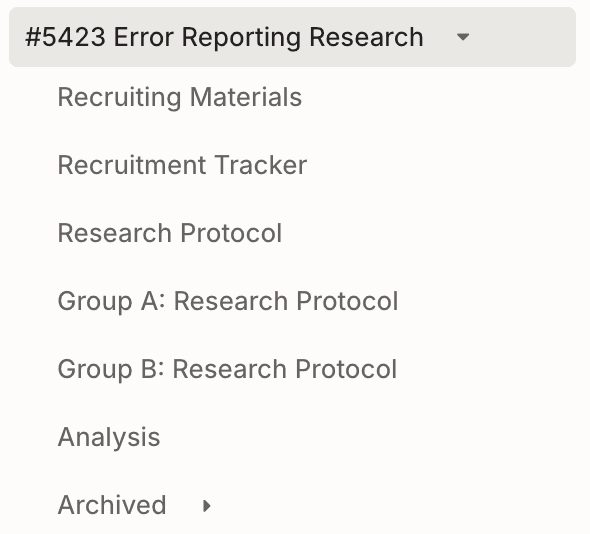


Using Gitbook and Github to track research deliverables

Interview Protocol Excel Template
Analysis and Next Steps: Taking the research, making sense of it all and turning it into product direction
I used qualitative coding, affinity mapping and workflow mapping to bring together insights from 13 interview sessions and user discussions during a partner webinar. AI tools supported the analysis as I explored patterns in how users interpreted reports, found guidance and coordinated corrections. Comparing workflows helped distinguish shared challenges from constraints specific to individual organizations.
Finding common themes while also giving attention to the surprises and uncommon situations
Coding data as a party of nearly one takes an immense amount of time and eventually that had to be abandoned and to speed up the work, I utilized AI to reanalyze the interviews. This work was done after multiple research synthesis meetings with my co-researcher on the project. This allowed time for us to put intentional thinking and crticial reflection while trying to remove any bias AI might impose.
Final Affinity Map
Utilizing Notebook LM as a tool to speed up the coding analysis and propose points that we may not have considered
I was doing most of the coding, and reviewing the interviews by hand was taking too much time. After several discussions with my co-researcher, I utilized AI to reanalyze the interviews. This work was done after multiple research synthesis meetings with my co-researcher on the project. This allowed time for us to put intentional thinking and crticial reflection while trying to remove any bias AI might impose.

Using Notebook LM to help in the qualitative thematic analysis of the interviews
The research continues with internal collaboration with development team and technical product manager
Coding data as a party of nearly one takes an immense amount of time and eventually that had to be abandoned and to speed up the work, I utilized AI to reanalyze the interviews. This work was done after multiple research synthesis meetings with my co-researcher on the project. This allowed time for us to put intentional thinking and crticial reflection while trying to remove any bias AI might impose.

Co-collaboration between design, product manager and development team
Prior to this study, it was hard to understand the holistic process. I made common correction workflows more visible.
The team had not previously documented how users corrected errors after submitting data, so I took the initiative to map these processes using insights from the interviews. The maps traced how users reviewed reports, investigated issues and coordinated corrections across internal systems, program staff, IT teams and vendors. Making these workflows visible helped us understand differences across organizations, identify handoffs and constraints outside the portal and uncover opportunities for TDP to better support the correction process.


Mapping out 7 of the 13 different error correction process workflows
Prioritizing short term fixes and planning for long term product enhancements and features
The findings helped us identify improvements we could make now while setting a direction for longer-term work. One short-term fix was adding a README tab to generated error reports to give users more information and guidance. Longer-term priorities included clearer connections between report types, plain-language error explanations and in-app reports that users could sort, filter and group. We also identified opportunities to help users share relevant errors with other teams and catch issues before submission.
Updated Generated Error Report includes a Readme

Mural of mapping out next steps for the roadmap and ticket tracking
Reflection
Although I led this study, my colleague facilitated several sessions. Watching another researcher work helped me learn new ways to follow unexpected conversations, adapt the interview guide and make sense of feedback when sessions took a different direction.
I also learned that research continues beyond interviews and sticky notes in Mural. Internal discussions, planning conversations and customer insights about their users and partners can raise new questions or add context to earlier findings.
The biggest challenge is keeping those findings visible as the product team balances competing priorities. Documenting what we learned is only part of the work. Connecting findings to upcoming decisions and revisiting them during planning helps keep the research useful.