


Reimagining Heuristic Evaluations with AI
Oct 2024 – Jan 2025
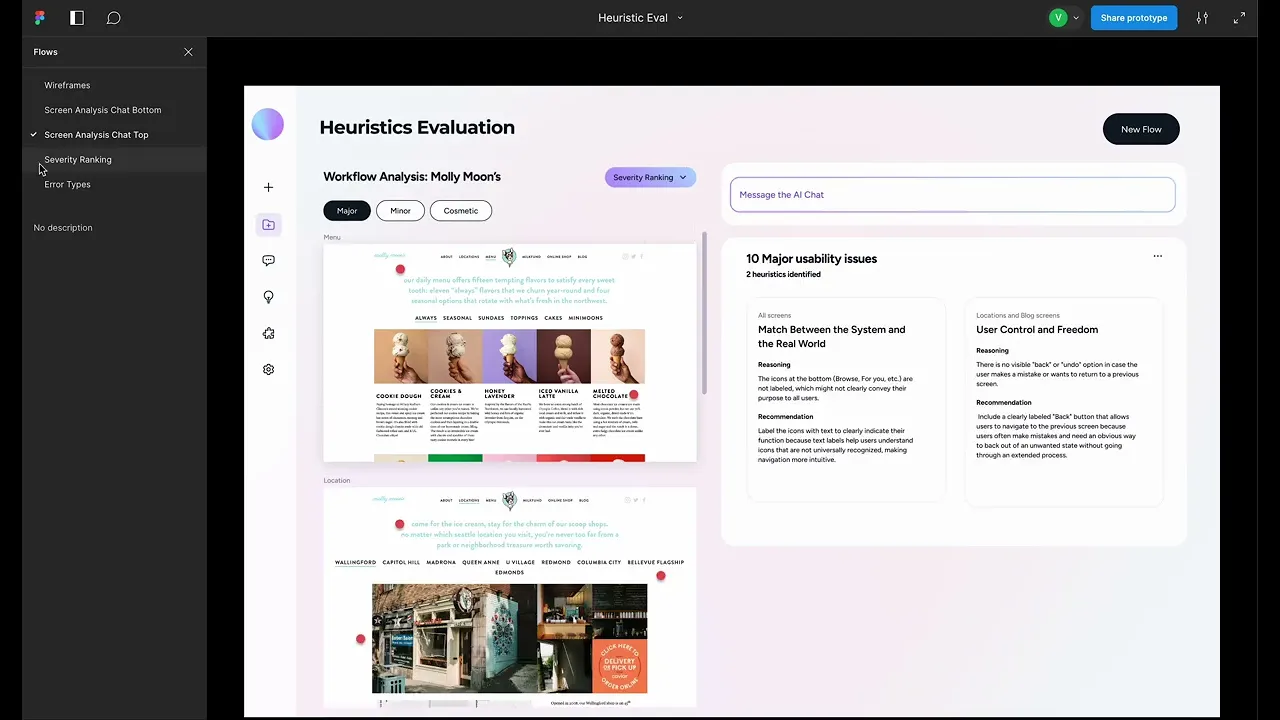
A product concept exploring how multimodal AI could analyze interface screenshots, evaluate usability heuristics, assign severity ratings and generate actionable reports for design teams.
Role
Product Designer
Tools
Figma, Material UI, OpenAI
Client
PhD Human Centered Design & Engineering Student at the University of Washington
Industry
Human Computer Interaction (HCI)
Product Concept
Multimodal AI
Accessibility


Enabling UX researchers to identify issues
A product concept exploring how multimodal AI could analyze interface screenshots, evaluate usability heuristics, assign severity ratings and generate actionable reports for design teams.
🔔 Teeny disclosure — the heuristic evaluation features and visuals used on Molly Moon's are for demo purposes only. I had an intense craving for ice cream at the time. They're a great local Seattle business btw.
Background and motivation
Heuristic evaluations are a valuable way to identify usability issues, but the process can be time consuming, inconsistent and difficult to scale across multiple workflows.
This concept explores how AI-generated heuristic evaluation outputs AI might support design and research teams by analyzing interface screenshots against established usability principles, surfacing potential issues and generating structured recommendations for review with user input and feedback.
The goal was not to replace expert evaluation, but to create a tool that helps teams move faster, spot patterns earlier and turn usability findings into clearer product decisions.
Impact and results
This project received extremely positive qualitative feedback from the PhD HCDE student that I served with no intense rework. During handoff, I was informed that the Figma file would go into implementation, contributing to their PhD work in Human Centered Design and Engineering.
Process, Approach & Methods
Stakeholder Interview
Competitive Analysis
Feature Prioritization
Sketching
Prototyping
Important to note, a ton of research was done prior to the design phase in which I was not previously invovled with. This included an extensive research paper that provided findings section contains details about the characteristics of the generative AI outputs.
Making sense of the work already done and creating an application that makes issues easier to understand
Responsible for the designs of this phase of the project, we started off with an initial meeting to understand the goals of this project and what requirements would create the most value and scaleability. We prioritized:
Consistency issues across multiple screens and making it clear on what needs attention and action
Identifying the different ways in which a user can understand and sort error types in a way that is easy to understand the context and way forward.
User engagement with the AI tool

Previous content work samples provided to me
Using Open AI to see what I may have missed and provide additional ideas
After I recorded my own thoughts and Ideas I utilized OpenAI think of what other ways the assistant may be able to help in heuristic evaluations after I got my thoughts recorded. Additionally in the design process, I had Open AI produce more concise and pointed content for the prototypes to align with the lighter, direct tone of the applicaiton.
Brainstorming ways in which AI could assist users noting which were generated by Open AI
Capturing requirements and the status of each to create transparency with the customer
Designing for accessibility
I quite enjoy thinking about the little things in design.
In this instance I proposed micro components and features, giving users multiple options to display severity labels for those with unique color vision abilities and integrating WCAG standards alongside heuristic evaluation issues identified within the system.
Color accessibility was a feature that I proposed as it’s a huge component in web products to adhere too, but not initially part of the project requirements.


Early sketches exploring multiple ways to view and interact with heuristics issues
Creating space for human agency & AI transparency
Following suit on emphasizing the value of human input to create a smarter detection of heuristics, this incorporating user feedback through response options, citing sources and giving the option to learn more.


Wireframe samples exploring different interaction and click states
Watch the prototype walkthrough and handoff
Coupled with almost weekly 1:1 meetings, I sent a total of three walkthrough videos of the prototype since to be transparent with the work in progress and thought process. The recording below is third and final video that includes the demo of the prototype, with the different features and components brought together and the applications' subtle interactivity.
Handoff walkthrough video of the application designs
Reflection
It was an honor to be invited to participate in this project. The opportunity rekindled up my love affair for visual design. This was completed right before using AI to design boomed. Since then, I felt I needed to go back to the basics of what it means to design with and for AI and to be honest, I'm still learning and it's been a humbling journey.
What I would've done with validation testing and AI in mind
Coupled with almost weekly 1:1 meetings, I sent a total of three walkthrough videos of the prototype since to be transparent with the work in progress and thought process. The recording below is third and final video that includes the demo of the prototype, with the different features and components brought together and the applications' subtle interactivity.
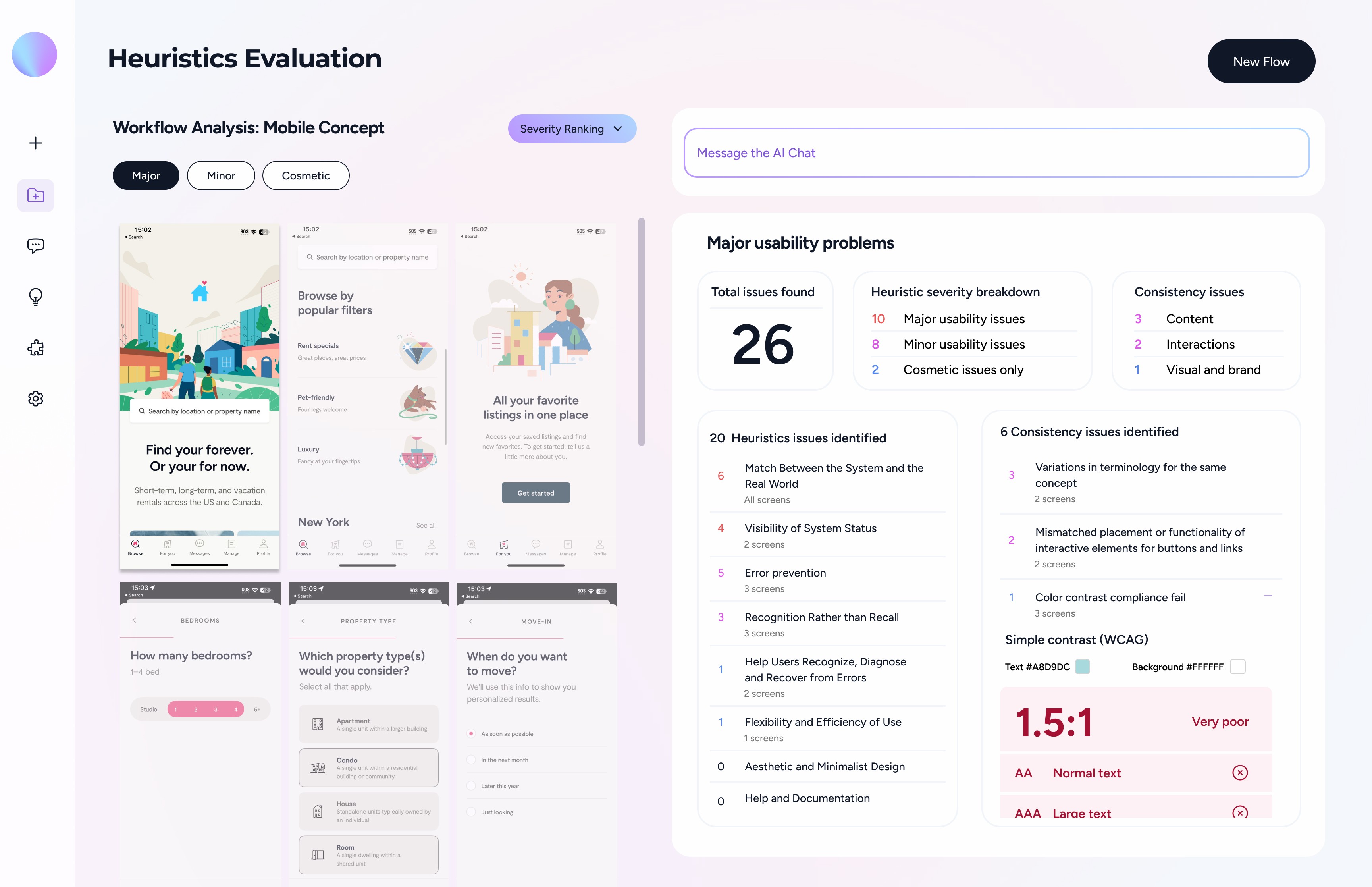
Utilized Figma Make to build out mobile analysis layouts and ideas that I wasn't able to fully capture or explore in the time that was given. Below is just one of two screens that I was able to create, but was not entirely confident in the layout and interactivity.
Brainstorming ways in which AI could assist users noting which were generated by Open AI
Concept tested these designs with users who own their unique application that needs evaluating and how this would or would not help in their day to day work. I would have also liked to gauge sentiment on how this tool affects a user's confidence in their work efficiency and accuracy.
Diving deep in what it means to build trust with users through the use of AI. Though we were transparent in not giving the model a name, I would explore more unique ways in which AI would have assisted with existing user data and exploring what work would look like if a user owned multiple applications or web based products. How might we better create consistency across multiple products and not just a singular standalone project?